Fill out Form 8822 online
Change of Address
Tells the IRS about a change of home or mailing address.
Opens in the DocZap editor. What you type stays in your browser.
- Published by
- IRS
- Version
- Rev. February 2021
- Length
- 2 pages
- Fillable fields
- 27
27 fillable fields
What to know about Form 8822
- Tells the IRS that your home or mailing address has changed.
- Businesses use Form 8822-B for a change of business address.
Have these ready
- Your name, address, and taxpayer ID number
- The tax years and forms your request is about
- Any IRS notice you are responding to, so you can match its details
What's on Form 8822
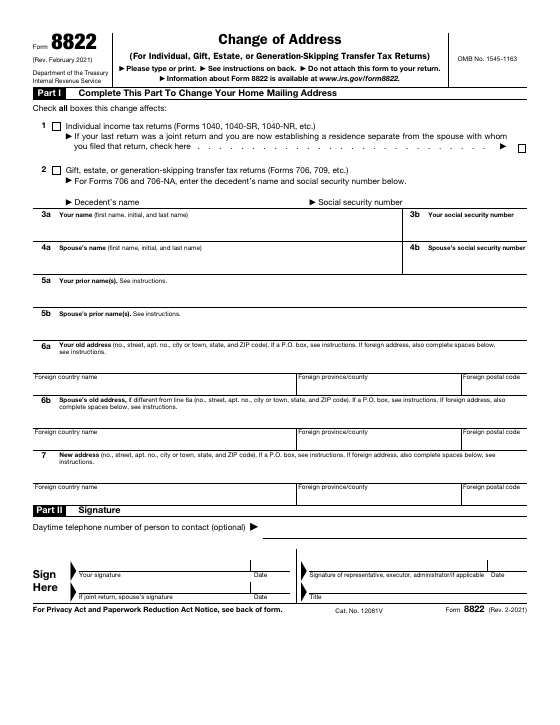
This is the Rev. February 2021 version, 2 pages long, with 27 fillable fields, including 22 text boxes and 3 checkboxes. In the editor, the fillable fields are highlighted so you can see where to type.
The form is organized into parts:
- Part I: Complete This Part To Change Your Home Mailing Address
- Part II: Signature
How filling it in works
- 1
Open the form
Choose "Fill this form". The blank Form 8822 opens in the editor.
- 2
Type into it
Click a field and type, or click a box to tick it. Use Text for anything that isn't a field.
- 3
Download your copy
Press Done to save the filled-in PDF to your device. Nothing is uploaded.
After you fill it in
Frequently asked questions
Is this the official Form 8822?+
It is the blank PDF published by the IRS (Rev. February 2021). DocZap hosts a copy and isn't affiliated with the IRS. Before you submit it, check the IRS forms and instructions page for a newer version.
How do I fill out Form 8822 online?+
Choose "Fill this form" and the blank form opens in the DocZap editor with 27 fillable fields. Click a field to type, or click a box to tick it. For anything that isn't a field, use the Text tool to type anywhere on the page, or the Image tool to add a picture of your signature. Press Done to download your copy.
Is what I type uploaded anywhere?+
No. The blank form loads from this site, then everything you type stays in your browser tab. Nothing is sent to a server and nothing is saved when you close the tab, so download your finished PDF before you leave.
Where do I send Form 8822 once it's filled in?+
It depends on the form and your situation. The instructions for Form 8822 explain who receives it and how to submit it, so read them first. They are on the IRS forms and instructions page.
How long is Form 8822?+
This PDF (Rev. February 2021) is 2 pages long and has 27 fillable fields, including 22 text boxes and 3 checkboxes.
What parts does Form 8822 have?+
Form 8822 starts with Part I: Complete This Part To Change Your Home Mailing Address; Part II: Signature. The instructions explain what to enter in each part.
Does it cost anything?+
No. There is no account, no watermark, and no limit on how many forms you fill in.
More irs requests and relief forms
DocZap isn't affiliated with the IRSor any government agency, and this page isn't legal or tax advice. Find the latest version, instructions and submission details on the IRS forms and instructions page.